


Overview
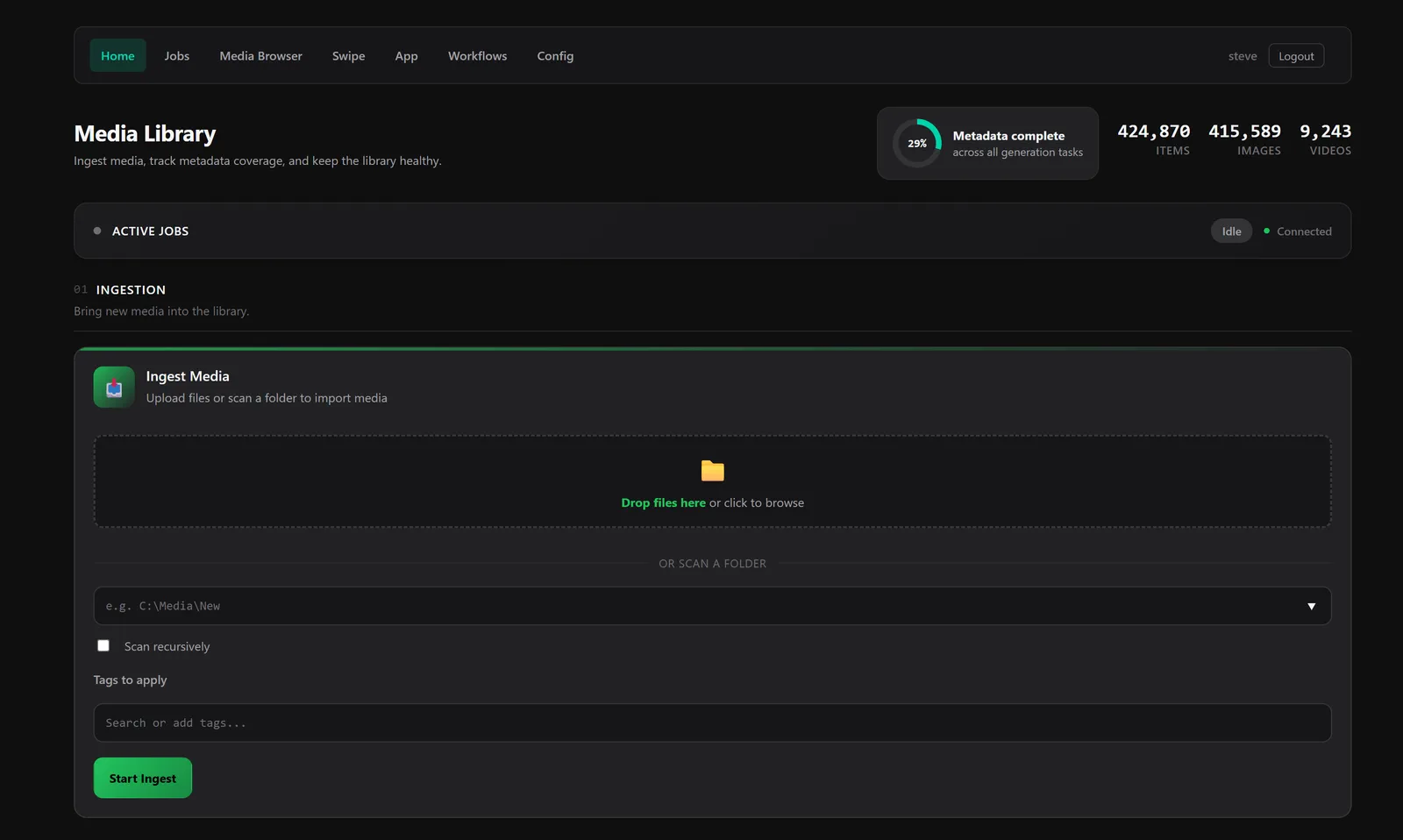
Lowkey Media Server is a companion application for the Lowkey Media Viewer that manages long-running offline tasks. Built in Go, it runs as an HTTP server on port 10111.
- Job queue with persistence and real-time status updates
- Media ingestion from local directories, YouTube, and gallery sites
- AI-powered auto-tagging using ONNX models
- Visual similarity search with local image embeddings
- Face recognition that clusters faces into people (photos and anime)
- LLM vision integration for image descriptions
- Video transcription with Faster Whisper
- Browser extensions for Chrome and Firefox
- Web-based media gallery and search
Core Concepts
Three things carry the whole server: a library database that catalogs your media without moving it, storage roots that say where that media lives, and a job queue that does the heavy work in the background. Everything else in these docs builds on those.
The Library
The library is a single SQLite database. Every media item is one row keyed by its path. The server never moves, renames, or re-encodes your files to manage them, so adding media to the library means recording where it is rather than copying it somewhere.
Everything the server knows about an item hangs off that row: tags and categories, the AI description, the transcript, hash, file size and dimensions, visual embeddings, detected faces and the people they group into, and its Battle Mode ELO rating. Deleting an item from the library removes the row and its metadata; the file itself is only touched by explicitly destructive actions.
The desktop viewer and the server share this same database, so tagging in one is instantly visible in the other. They are two views of one library.
Storage Roots
A storage root is a place the server is allowed to read and write media: a local directory, or a bucket (optionally scoped to a key prefix) on any S3-compatible object store. A library can span several roots of either kind, and every feature (browsing, ingest, thumbnails, AI processing, the web viewer) works the same over both.
Roots are also the server's security boundary. The file browser, library scans, and media serving are confined to configured roots, and view-only public visitors can never reach a path outside them.
The default root
One root is the default, the destination for anything the
server creates: uploads from the web UI land under uploads/, and media
ingested from YouTube, Discord, or gallery URLs lands under downloads/.
Mark a root as default explicitly (the wizard and Config page have a toggle;
"default": true in JSON); otherwise the first root is used.
Local vs. S3-compatible roots
The abstraction is the same, but the mechanics differ in ways worth knowing:
| Local root | S3-compatible root | |
|---|---|---|
| Path stored in the library | Absolute filesystem path | s3://bucket/key |
| Browsing & scanning | Reads the filesystem directly | Lists objects via the S3 API |
| Serving media | Streamed by the server (/media/file) | Presigned URL; the browser fetches straight from the object store (1-hour expiry) |
| Processing tasks (hash, embed, describe, faces, …) | Read the file in place | The object is downloaded to a temporary local copy for the task, then cleaned up |
| New files (uploads, URL ingests) | Written directly into the folder | Staged locally, then uploaded to the bucket |
| Thumbnails | Generated into a local cache directory | Stored in the bucket under thumbnailPrefix (default _thumbnails, hidden from browsing) |
In practice: S3 roots make the library location-independent and shareable, but every per-item processing task pays for a download first, so big batch jobs (embedding or transcribing an entire bucket) move a lot of bytes. Local roots are the fast path for processing. A common setup is a local working root plus an S3 archive root in the same library.
Configuring roots
Three ways, in increasing order of precedence:
- Setup wizard: the first-run
/setupflow registers local and S3 roots, with a connection test for S3. - Config page (
/config) orconfig.json: therootskey. Saving applies immediately, no restart needed. - Environment variables:
LOWKEY_ROOT_<N>for local paths, orLOWKEY_ROOTSas a JSON array for anything (see Environment Variables). Env-supplied roots fully replace the config file's roots for that run and are never written back to the file. This is what the Docker examples use.
S3 root fields
An S3 root is described by these fields, whether it's defined in the wizard,
config.json, or LOWKEY_ROOTS:
| Field | Required | Description |
|---|---|---|
type | Yes | Must be "s3" |
label | Yes | Display name in the UI |
endpoint | Yes | S3 API endpoint URL |
region | Yes | AWS region or equivalent |
bucket | Yes | Bucket name |
accessKey | Yes | Access key ID |
secretKey | Yes | Secret access key |
prefix | No | Key prefix to scope browsing (e.g. "photos/") |
thumbnailPrefix | No | Separate prefix or bucket path for generated thumbnails |
default | No | Set to true to make this root the upload/download destination |
Tested S3-compatible services
| Service | Endpoint Format |
|---|---|
| AWS S3 | https://s3.<region>.amazonaws.com |
| MinIO | http://<host>:9000 |
| Backblaze B2 | https://s3.<region>.backblazeb2.com |
| Cloudflare R2 | https://<account-id>.r2.cloudflarestorage.com |
| DigitalOcean Spaces | https://<region>.digitaloceanspaces.com |
Jobs, Tasks & Workflows
Every operation the server performs (an ingest, a batch of descriptions, an ffmpeg conversion) runs as a job in a persistent queue. Jobs survive restarts, stream their output live, and can be cancelled, copied, and monitored from the home page (see Job Queue).
A task is the thing a job runs. Most tasks are per-item operations
(describe, transcribe, hash, dimensions, autotag, embed, faces) that share one
contract: give them a query or a path, and they process each matching item, skipping
items that already have the result unless you ask them to overwrite. The
process task combines several of these ops into a single pass over the
library. The full list is in Available Tasks.
A workflow is a saved, named graph of tasks with dependencies
between steps: ingest, then hash, then embed and describe in parallel, for
example. If a step fails, its pending dependents are cancelled rather than run
against missing input. Workflows are created and run from the
/workflows pages, and can also be launched from the viewer's Context
Palette against whatever you clicked.
Getting Started
Installation
Download and run the Media Server executable. On Windows, it runs in the system tray for easy access. On Linux, run the binary from the command line.
Initial Setup
On first launch every page redirects to a setup wizard at
/setup. The wizard walks you through creating a
real account (the server boots with a temporary
admin / admin user that is deleted as
soon as your account exists), choosing or reusing a SQLite
database file, registering storage
roots (local directories and S3-compatible buckets, with a
Test connection check for S3), and downloading
the optional AI models. Finishing the wizard sets
setupComplete in the config file; after that the
setup pages require an admin login.
For headless installs, set LOWKEY_ADMIN_USER and
LOWKEY_ADMIN_PASSWORD to provision the account on
first boot and skip the interactive account step. See
Users & Permissions for JWT details and
how to add or remove users later.
Installing Dependencies
The Media Server uses external tools and AI models for media processing. They come in three flavors:
- Bundled binaries:
ffmpeg,ffprobe,exiftool, the ONNX worker binaries, and the ONNX Runtime library ship in thebin/folder next to the server executable. Nothing to install. - Optional tools:
yt-dlp,gallery-dl,ollama, and DiscordChatExporter are detected on the systemPATH. Install them with your package manager to turn on the corresponding tasks; the Dependencies page shows what each one enables. - Downloadable models: the AI models are downloaded on demand from the setup wizard or the Dependencies page (
/settings/dependencies). Downloads are resumable and verified against pinned SHA-256 checksums before use.
Downloaded models are stored under the server's data directory:
Windows: %APPDATA%\Lowkey Media Viewer\models\Linux: ~/.local/share/lowkey-media-viewer/models/macOS: ~/Library/Application Support/Lowkey Media Viewer/models/
Available model downloads include:
- wd-eva02-large-tagger-v3 - auto-tagging (~1.3 GB)
- siglip2-base-patch16-224 - visual similarity and text-to-image search (~1.5 GB)
- dinov2-base - image-only similarity (~350 MB)
- yunet / sface / anime-head / ccip - face detection and recognition for photos and anime
- faster-whisper - video transcription (~1.5 GB; setting
fasterWhisperPathto an existing install works too)
Web Interface
Access the web interface at http://localhost:10111.
The home page shows the job queue with all running and completed jobs.
Docker Quick Start
The fastest way to run Lowkey Media Server is with Docker. A single command gets you a working server with ffmpeg and all core dependencies pre-installed.
Run the Container
Pull the image and start the server:
docker run -d --name lowkey-media-server \ -p 10111:10111 \ -v lowkey-data:/data \ ghcr.io/stevecastle/lowkey-media-server:latest
Open http://localhost:10111 in your browser. The first visit lands on the
setup wizard; set LOWKEY_ADMIN_USER and
LOWKEY_ADMIN_PASSWORD to provision the admin account without it.
Docker Compose + MinIO
The repo ships a compose file that starts the server together with a MinIO S3 backend,
pre-wired as the default storage root (buckets media and
media-thumbnails are created automatically):
docker compose -f media-server/docker-compose.yml up --build
- Server:
http://localhost:18090(change the host port withLOWKEY_PORT=... docker compose up) - MinIO console:
http://localhost:19001(admin/adminadmin)
Local Storage
To browse media from your local filesystem, bind-mount your directories into the container and register them as storage roots with environment variables.
docker run -d --name lowkey-media-server \ -p 10111:10111 \ -v lowkey-data:/data \ -v /path/to/photos:/mnt/photos:ro \ -v /path/to/videos:/mnt/videos:ro \ -e LOWKEY_ROOT_1=/mnt/photos:Photos \ -e LOWKEY_ROOT_2=/mnt/videos:Videos \ ghcr.io/stevecastle/lowkey-media-server:latest
Each LOWKEY_ROOT_<N> variable registers a storage root.
The format is path or path:label where the label is
the display name shown in the UI. If omitted, the path is used as the label.
Mount directories as read-only (:ro) if you only want to browse and process
media without the server modifying your files.
S3-Compatible Storage
Lowkey Media Server can browse and process media stored in any S3-compatible object storage service: AWS S3, MinIO, Backblaze B2, Cloudflare R2, DigitalOcean Spaces, and others.
Use the LOWKEY_ROOTS environment variable with a JSON array to configure S3 backends.
You can mix local and S3 roots in the same configuration. Mark one root with
"default": true to make it the upload and download destination, where
uploaded files and ingested media are stored. If no root is marked default,
the first root is used.
S3 Only
docker run -d --name lowkey-media-server \ -p 10111:10111 \ -v lowkey-data:/data \ -e 'LOWKEY_ROOTS=[{ "type": "s3", "label": "My Media Bucket", "endpoint": "https://s3.us-east-1.amazonaws.com", "region": "us-east-1", "bucket": "my-media", "prefix": "photos/", "accessKey": "AKIAIOSFODNN7EXAMPLE", "secretKey": "wJalrXUtnFEMI/K7MDENG/bPxRfiCYEXAMPLEKEY", "thumbnailPrefix": "thumbs/", "default": true }]' \ ghcr.io/stevecastle/lowkey-media-server:latest
Mixed Local + S3
docker run -d --name lowkey-media-server \ -p 10111:10111 \ -v lowkey-data:/data \ -v ~/photos:/mnt/photos:ro \ -e 'LOWKEY_ROOTS=[ {"type": "local", "path": "/mnt/photos", "label": "Local Photos"}, { "type": "s3", "label": "Cloud Archive", "endpoint": "https://s3.us-west-2.amazonaws.com", "region": "us-west-2", "bucket": "media-archive", "accessKey": "AKIAIOSFODNN7EXAMPLE", "secretKey": "wJalrXUtnFEMI/K7MDENG/bPxRfiCYEXAMPLEKEY", "default": true } ]' \ ghcr.io/stevecastle/lowkey-media-server:latest
The full S3 field reference, the list of tested S3-compatible services, and the behavioral differences between local and S3 roots are covered in Storage Roots.
Environment Variables
Every server setting can be set with an environment variable; the full table lives in
Configuration. The image itself presets
LOWKEY_DB_PATH=/data/db/media.db,
LOWKEY_DOWNLOAD_PATH=/data/downloads,
XDG_DATA_HOME=/data (so config and models persist in the volume), and
LOWKEY_OLLAMA_BASE_URL=http://host.docker.internal:11434. The container
listens on 10111; pick the host port with -p rather than
LOWKEY_PORT.
If you're running Ollama on the host machine for AI descriptions,
the default LOWKEY_OLLAMA_BASE_URL will find it automatically on macOS and Windows.
On Linux, add --add-host=host.docker.internal:host-gateway to the docker run command.
Data Persistence
All server state is stored in the /data volume inside the container.
Using a named volume (lowkey-data) ensures your data survives container
restarts, upgrades, and image rebuilds.
/data/ db/media.db # SQLite database downloads/ # Downloaded media (when no default storage root is set) lowkey-media-viewer/config.json # Auto-generated configuration lowkey-media-viewer/models/ # Downloaded AI models cache/ # Runtime caches
To back up your data, use docker cp or mount a host directory instead
of a named volume:
docker run -d --name lowkey-media-server \ -p 10111:10111 \ -v /path/to/lowkey-data:/data \ ghcr.io/stevecastle/lowkey-media-server:latest
Configuration
Configure the server through the web interface at /config or edit the config file directly:
Windows: %APPDATA%\Lowkey Media Viewer\config.jsonLinux: ~/.local/share/lowkey-media-viewer/config.json (or $XDG_DATA_HOME/lowkey-media-viewer/)macOS: ~/Library/Application Support/Lowkey Media Viewer/config.json
Set LOWKEY_CONFIG_PATH to use a different location. Precedence is
environment variables > config.json > built-in defaults; nearly every
key below has a matching LOWKEY_* env var (see the
table at the end of this section). Storage roots supplied via
env are never written back into the file.
Server
- port - HTTP listen port (default 10111; restart to apply)
- dbPath - Path to the SQLite database
- roots - Storage roots (local directories and S3 buckets); mark one
"default": trueto receive uploads and downloads - downloadPath - Fallback download directory when no storage root is configured
- defaultStartPath - Folder the web app opens on a fresh session
- allowPublicAccess - View-only anonymous access (default false; applies without restart)
- jwtSecret - JWT signing secret (auto-generated if unset)
- setupComplete - Set by the setup wizard; clear it to re-run the wizard
- discordToken - Discord token for media export
LLM & Vision
- inferenceProvider -
off,ollama(default),runpod,lmstudio, orllamacpp - ollamaBaseUrl / ollamaModel - defaults
http://localhost:11434/llama3.2-vision - lmstudioBaseUrl / lmstudioModel / lmstudioApiKey, llamacppBaseUrl / llamacppModel / llamacppApiKey, runpodEndpoint / runpodApiKey - alternate providers
- describePrompt - Prompt used for image descriptions
- inferenceConcurrency - Per-provider request caps
Transcription
- transcriptionProvider / transcriptionModel / transcriptionLanguage / transcriptionVadFilter - defaults
whisper-cli/ provider default /en/ on - fasterWhisperPath - Use an existing Faster Whisper install instead of the downloadable one
ONNX Tasks (embedding, autotag, faces)
- embeddingModel / embeddingProvider / embeddingPerformance / embeddingWorkers / embeddingThreads - defaults
siglip2-base-patch16-224,cpu,balanced - autotagModel / autotagProvider / autotagPerformance / autotagWorkers / autotagThreads - default model
wd-eva02-large-tagger-v3 - onnxTagger.generalThreshold / characterThreshold - tag confidence cutoffs (defaults 0.35 / 0.85)
- faceModel / faceProvider / facePerformance / faceRouting - defaults
sface,cpu,balanced,auto; byoFaceModels registers bring-your-own ONNX recognizers - onnxFileTimeoutSeconds - Per-file watchdog (default 120; 0 disables)
Environment Variables
All server settings can be configured with environment variables, no config file needed.
Environment variables always win over config.json, which wins over built-in
defaults. Storage roots supplied via env are never written back into the config file.
| Variable | Default | Description |
|---|---|---|
LOWKEY_PORT | 10111 | HTTP listen port |
LOWKEY_DB_PATH | data dir + media.db | SQLite database path |
LOWKEY_CONFIG_PATH | data dir + config.json | Config file location override |
LOWKEY_DOWNLOAD_PATH | ~/media | Fallback download directory when no storage root is configured |
LOWKEY_ADMIN_USER / LOWKEY_ADMIN_PASSWORD | Provision the admin account on first boot (headless setup) | |
LOWKEY_ALLOW_PUBLIC_ACCESS | false | View-only anonymous access to the gallery, search, and Swipe app |
LOWKEY_JWT_SECRET | (auto-generated) | JWT signing secret for authentication |
LOWKEY_OLLAMA_BASE_URL | http://localhost:11434 | Ollama API endpoint for LLM features |
LOWKEY_OLLAMA_MODEL | llama3.2-vision | Vision model for image descriptions |
LOWKEY_DISCORD_TOKEN | Discord token for media export | |
LOWKEY_FASTER_WHISPER_PATH | Path to an existing faster-whisper install | |
LOWKEY_ROOT_1, _2, ... | Local storage roots (path or path:label) | |
LOWKEY_DEFAULT_ROOT | first root | Which LOWKEY_ROOT_<N> receives uploads/downloads (1-based index or label) |
LOWKEY_ROOTS | JSON array of storage roots, local and S3 (set "default":true on one); wins over LOWKEY_ROOT_<N> |
Every other config key has an env twin as well: inference providers
(LOWKEY_INFERENCE_PROVIDER, LOWKEY_LMSTUDIO_*,
LOWKEY_LLAMACPP_*, LOWKEY_RUNPOD_*,
LOWKEY_INFERENCE_<PROVIDER>_CONCURRENCY), transcription
(LOWKEY_TRANSCRIPTION_PROVIDER|MODEL|LANGUAGE|VAD), and ONNX task tuning
(LOWKEY_EMBEDDING_*, LOWKEY_AUTOTAG_*, LOWKEY_FACE_*,
LOWKEY_ONNX_FILE_TIMEOUT), matching the keys above.
Users & Permissions
The media server uses JWT-based authentication. All admin pages, the App Experience, the Swipe App, and the JSON API require a valid session. The system is intentionally simple today: there is one role (admin) and one shared user list. Everyone you create has full access to the server.
First-Run Setup
On the very first launch, before any users exist, the server creates a temporary administrator account:
username: adminpassword: admin
Visit http://localhost:10111 and you'll be
redirected to the setup wizard at /setup, which has
you register a real account. The default admin is deleted as
soon as your new user is created, and there's no way to skip that
step while the default admin is still present. Headless installs
can pre-provision the account with LOWKEY_ADMIN_USER
/ LOWKEY_ADMIN_PASSWORD.
Pick a username and a strong password. Passwords are stored as bcrypt hashes; the server never stores or transmits them in plaintext.
Managing Users
Once you're logged in, open the Config tab in the web UI. The Users section shows every registered account and lets you:
- Add a user: type a username and password and click Create.
- Delete a user: click Delete next to the user you want to remove. The server refuses to delete the last remaining user so you can never lock yourself out.
The same operations are available over the JSON API for automation:
GET /auth/users # list usersPOST /auth/users { username, password } # create userDELETE /auth/users?username=alice # delete user
You'll need a valid session cookie or
Authorization: Bearer <token> header from
POST /auth/login to call any of these.
JWT & Sessions
POST /auth/login exchanges credentials for a JWT.
The token is returned in the response body and set as
an auth_token HttpOnly cookie
(SameSite=Lax) for browser use. Subsequent
requests are accepted with either the cookie or an
Authorization: Bearer <token> header. The
browser extensions and the Electron app use the header; the web
UI uses the cookie.
- Cookie lifetime: 24 hours from issue.
- JWT lifetime: 1 year (Bearer-token clients stay logged in until they explicitly log out).
- Logout:
POST /auth/logoutclears the cookie. Bearer tokens remain valid until expiry. There is no server-side token revocation list, so rotate the JWT secret if you need to invalidate everyone. - Signing secret: set
LOWKEY_JWT_SECRETto a long random string in production. If unset, one is auto-generated and persisted into the config file on first run.
Roles & Permissions
Right now there is exactly one role: admin.
Every authenticated user is treated as an admin and can do
everything: manage other users, edit configuration, run any
task, browse and modify all media. Per-route role separation
(RolePublic vs. RoleAdmin) exists in
the middleware so a more granular system can be added later
without redesigning the auth flow, but until then:
- Only create accounts for people you would trust with the box itself.
- Don't expose the server to the open internet without putting it behind a reverse proxy with TLS and additional restrictions (e.g. IP allow-list or an OAuth front-door).
- There is no rate limit on
/auth/loginyet, so make sure passwords are strong, especially if the server is publicly reachable.
A future release will add proper role separation (read-only users, per-storage-root access, scoped API tokens). The underlying schema and middleware already account for it.
Account Recovery
There is no password-reset flow. If you lose your only password,
recover access by stopping the server and clearing the
users table from SQLite:
sqlite3 /path/to/media.db "DELETE FROM users;"
Restart the server. The default admin / admin
account is recreated and you'll be sent through the setup wizard
again. Your media, tags, jobs, and workflows are untouched;
only the user list is reset.
Job Queue
The job queue manages all processing tasks with persistence and real-time updates via Server-Sent Events (SSE).
Creating Jobs
Create jobs through the web interface, browser extension, or API. Each job specifies:
- Task type (ingest, autotag, metadata, etc.)
- Input source (URL, file path, or directory)
- Optional follow-up tasks
Monitoring Progress
Jobs display real-time progress with live output streaming. Job states include:
- Pending - Waiting to start
- In Progress - Currently running
- Completed - Finished successfully
- Cancelled - Stopped by user
- Error - Failed with error
Job Management
Manage jobs with these actions:
- Cancel - Stop a running job
- Copy - Duplicate a job configuration
- Remove - Delete a job from the queue
- Clear - Remove all non-running jobs
Available Tasks
| Task ID | Name | Description |
|---|---|---|
ingest | Ingest Media Files | Scan a local directory or storage root, or download from YouTube / Discord / gallery URLs (yt-dlp, DiscordChatExporter, gallery-dl), with optional follow-up processing |
process | Process Media (Combined Ops) | Run any combination of the per-item ops below in a single pass over a query or path |
describe | Generate Descriptions | LLM vision descriptions via the configured inference provider |
transcribe | Generate Transcripts | Video transcription (Faster Whisper) |
hash | Generate Hashes | Content hash + file size |
dimensions | Generate Dimensions | Image/video width and height |
autotag | Auto Tag (ONNX) | ML-based automatic image tagging |
embed | Visual Embedding (ONNX) | Compute embeddings for similarity search |
faces | Detect Faces (ONNX) | Detect and embed faces, clustering incrementally |
faces-cluster | Cluster Faces into People | Group stored faces into people |
metadata | Generate Metadata (Legacy) | Legacy alias that maps --type onto the ops above |
hls | HLS Transcode | Adaptive streaming renditions for large videos |
move | Move Media Files | Move files and update database references |
remove | Remove Media | Remove entries from the database |
cleanup | CleanUp | Remove orphaned database entries |
lora-dataset | Create LoRA Dataset | Generate datasets for ML training |
ffmpeg, ffmpeg-* | FFmpeg Operations | Custom ffmpeg runs plus scale, convert, extract-audio, screenshot, thumbnail, reverse, speed, grayscale, blur, resize, crop, rotate, caption, and thumbnail-sheet variants |
save | Save File | Save a file into the library |
Media Ingestion
The ingest task scans and adds media to the database from multiple sources with optional follow-up processing.
Local Directories
Scan local directories to add media files to the database. Supports recursive scanning for nested folders.
YouTube Downloads
Download videos from YouTube and other sites using the bundled yt-dlp tool. Videos are automatically added to the database after download.
Gallery Downloads
Download media from gallery sites using gallery-dl. Supports hundreds of sites including:
- Twitter/X, Instagram, Reddit
- DeviantArt, ArtStation, Pixiv
- Tumblr, Flickr, and many more
AI & ML Features
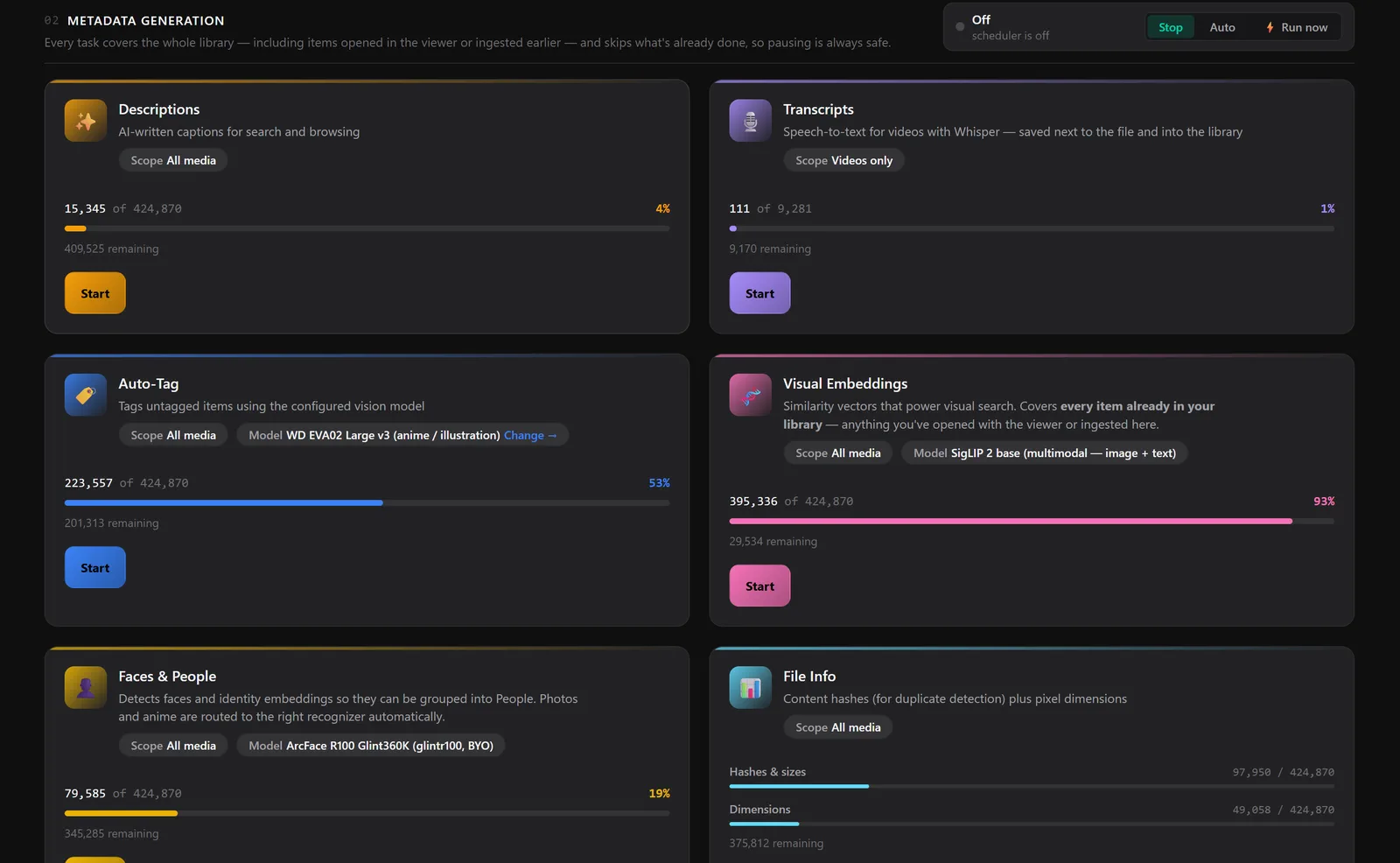
Every AI feature below runs as a metadata task over the whole library, including items you opened in the viewer or ingested earlier. Each one tracks its own coverage and skips what's already done, so you can stop and restart at any time without losing work or repeating it.
Auto-Tagging (ONNX)
Automatically tag images using ML models (WD Tagger). Configure thresholds for general and character tags.
- Batch processing of entire directories
- Configurable confidence thresholds
- Tags organized by category (Suggested, Character, etc.)
LLM Vision Descriptions
Generate image descriptions using Ollama with vision models (llama3.2-vision, etc.). Customize prompts for different use cases.
Transcription
Generate transcripts for videos using Faster Whisper. Transcripts are saved as VTT files and can be viewed in the Media Viewer. Transcription providers and the default model are configurable from the Config page, and the Whisper build installs on demand from the Dependencies page.
Face Recognition & People
The server can detect the faces in your library, compute a compact embedding for each one, and cluster them into people that show up in the viewer's People view. It handles photographs and drawn/anime-style characters, and everything runs locally.
Tasks
-
faces(Detect Faces, ONNX) scans media, detects faces, stores an embedding per face, and clusters incrementally as it goes, so people appear while a large scan is still running. Videos are scanned on a representative frame. -
faces-cluster(Cluster Faces into People) groups stored faces into people. Supports flags for the match threshold, minimum cluster size, quality floor, and two reset levels:--resetrebuilds only the anonymous "Unknown" groups, while--reset-allrebuilds everything except user-confirmed labels.
Models & Automatic Domain Routing
Two recognition pipelines ship built-in, installable from the Dependencies page:
- Photos - YuNet face detector + SFace recognizer
- Anime / drawn art - anime head detector + CCIP character recognizer
With routing set to auto (the default), each item is classified
photo-vs-anime using a SigLIP 2 text probe and sent to the right pipeline, so
one faces job covers a mixed library. Advanced users can also
point the config at their own ArcFace-family ONNX recognizer. Face inference
supports GPU acceleration via DirectML on Windows, configurable per-task from
the Config page.
Curation Model
Clustering respects your manual curation permanently:
- Locks - Faces you confirm are ground truth: they anchor the person, carry extra clustering weight, and survive every regroup.
- Rejections - A face you reject from a person can never rejoin that group, even after it dissolves and re-forms.
- Group bans - Deleting a person prevents the same group from silently re-forming on the next cluster pass.
Grouping thresholds (match strictness, minimum group size, quality floor)
are stored in server config and adjustable from the viewer's Tune panel or
via GET/POST /api/faces/tuning. A privacy wipe is available with
DELETE /api/faces/all?confirm=true.
Visual Similarity Search
Search the library by what media looks like, powered by image
embeddings computed entirely on your machine. Generate embeddings with the
embed task, then search three ways:
- Image → image - Find media similar to any item in the library
- Text → image - Describe what you want in plain words
- Clip → image - Search with any uploaded or captured image crop
Similarity predicates compose with tags, paths, and other filters in one query, and results are ranked by match score. Two embedding models are available from the Dependencies page and can coexist, since vectors are stored per model:
- SigLIP 2 (~1.5 GB, default) - Multimodal: powers image → image, text → image, and the blended image + text queries below.
- DINOv2 (~350 MB) - Image-only alternative with strong purely visual matching; text queries automatically fall back to SigLIP 2.
Embedding runs on persistent worker processes (the model loads once per job, not once per file) at below-normal OS priority, with optional DirectML GPU acceleration on Windows. Search is an exact, parallelized cosine scan with no approximate index, so the top match is always the true top match, and it stays at a few milliseconds even at tens of thousands of items. New media is added to the in-memory index the moment it's embedded, so fresh imports are searchable immediately.
Composite & Blended Queries
Similarity predicates aren't limited to a single reference. A query can carry a blend of nodes: library images, uploaded clips, and text concepts, each with a signed weight. The server normalizes every component, combines them into one weighted query vector in a shared embedding space, and runs a single ranked scan. So "like this image, plus 'at night' at 50%, minus 'blurry'" is one search, not several searches intersected after the fact.
- Weights are true shares of the final direction (each vector is normalized first)
- Negative weights steer results away from a concept or image
- Mixed text + image blends are embedded with the multimodal model so all nodes share one space
Composite queries are sent through POST /api/media/query as
nodes on a similar, clip, or
visual predicate. In the viewer this is the hover blend editor on
visual search chips.
3D Embedding Visualization
Explore your whole library as a 3D point cloud of its embedding space at
/viz/embeddings. Hover any point to preview the image or play the video.
Visually similar media clusters together.
App Experience
The full Lowkey Media Viewer runs inside any browser as a web
app, served by the media server at
http://[server-ip]:10111/app/. It's the same React
interface as the Electron desktop app (same layout, same
tagging panel, same hotkeys) routed over HTTP instead of
Electron IPC, so you can reach your library from any computer
on your network.
The static bundle is embedded into the server binary at compile time, so there is nothing extra to install. Log in once and the UI is ready to go.
- Same UI, anywhere: the renderer is shared between the desktop app and the web app. Anything you can do in the Electron viewer (tagging, Battle Mode, transcripts, comic archives, search) works in the browser.
- Remote-friendly: point a laptop, tablet, or second PC at your home server's IP and you have your entire library. Pair it with a reverse proxy and TLS for access from outside your network.
- HLS playback for big videos: videos stream as adaptive HLS so large files start instantly and scrub cleanly even over a slow connection.
- Authenticated: gated by the same login system as the rest of the server. See Users & Permissions.
Open http://[server-ip]:10111/app/ in a browser,
sign in, and use the viewer exactly like you would on the
desktop.
Media Browser
Browsing & Search
Browse your media collection through the web interface at /media.
Full-text search across filenames, descriptions, and tags.
File Serving
Stream media files directly from the server with caching headers for performance.
Access files at /media/file?path=...
Swipe App
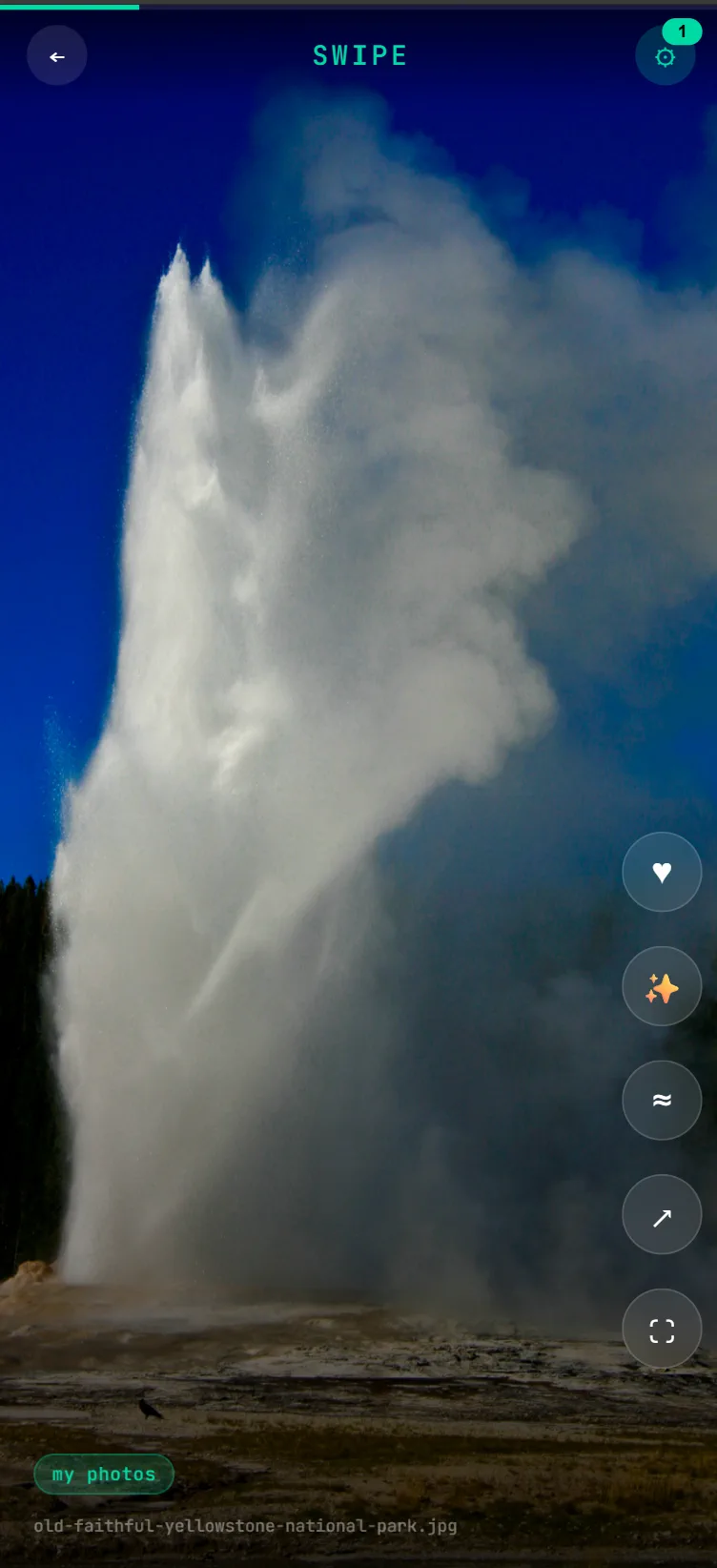
The Swipe App is a progressive web app (PWA) that provides a TikTok-like experience for browsing your media database. Install it on your smartphone to swipe through your collection with a mobile-optimized interface.
- Installable PWA - Add to your home screen for a native app experience
- Swipe Navigation - Swipe up/down to browse through media
- Mobile Optimized - Designed for touch and vertical video viewing
- Tag & Filter - Browse by tags and filter your collection
- More Like This - Switch to similarity mode to see media that looks like the current item, and re-anchor as you go
Access the Swipe App at http://[server-ip]:10111/swipe on your mobile device.
Browser Extensions
Install the browser extension for Chrome or Firefox to quickly create jobs from any webpage.
- Chrome: Load unpacked from
chrome-extension/folder - Firefox: Load from
firefox-extension/folder
Features:
- One-click task creation with current page URL
- Command selection dropdown
- Custom arguments support
- Real-time job status updates
API Reference
Job Management
| Method | Endpoint | Description |
|---|---|---|
| POST | /create | Create a new job |
| GET | /job/{id} | View job details |
| POST | /job/{id}/cancel | Cancel a running job |
| POST | /job/{id}/copy | Copy job configuration |
| POST | /job/{id}/remove | Remove a job |
| POST | /jobs/clear | Clear non-running jobs |
Media Operations
| Method | Endpoint | Description |
|---|---|---|
| GET | /media | Media gallery page |
| GET | /media/api | Media JSON API with search |
| GET | /media/file | Serve media files |
Visual Search
| Method | Endpoint | Description |
|---|---|---|
| POST | /api/media/query | Composable query (tags, text, similar/visual/clip predicates) |
| GET | /api/media/similar | Find media similar to a library item |
| GET | /api/media/search/visual | Text-to-image semantic search |
| POST | /api/media/search/image | Search by an uploaded image |
People & Faces
| Method | Endpoint | Description |
|---|---|---|
| GET | /api/people | List people |
| POST | /api/people | Create a person |
| POST | /api/people/{id}/rename | Rename a person |
| POST | /api/people/{id}/merge | Merge a person into another |
| DELETE | /api/people/{id} | Delete a person (?deleteFaces=true also purges faces) |
| GET | /api/people/{id}/faces | A person's faces, least typical first |
| POST | /api/faces/{id}/assign | Assign a face to a person (confirmed) |
| POST | /api/faces/{id}/reject | Reject a face from its person (permanent) |
| GET | /api/faces/ungrouped | Media or faces not yet grouped |
| POST | /api/media/search/face | Face-identity search by image |
| GET/POST | /api/faces/tuning | Read or set clustering thresholds |
| DELETE | /api/faces/all?confirm=true | Delete all face data (privacy wipe) |
System
| Method | Endpoint | Description |
|---|---|---|
| GET | /health | Server health and stats |
| GET | /stream | SSE stream for real-time updates |
| GET | /config | Configuration page |
| POST | /config | Update configuration |
| GET | /api/config | Active configuration (JSON, secrets redacted) |
| POST | /api/db/query | Read-only SQL over the library database |
Prefer a terminal? The lokictl CLI (in
media-server/cmd/lokictl) wraps the whole API: query and search media,
run jobs and workflows, manage tags, deps, and config. It's built for scripting and
AI-agent use.
Contact & Support
Report issues and request features on GitHub or via email.